Seamlessly Syncing Trello to Jira for Optimal Project Management
Modern project management teams often rely on multiple tools to manage tasks, track issues, and coordinate collaboration. Trello provides an intuitive visual interface for task management, while Jira offers powerful capabilities for issue tracking, agile development, and project reporting.
However, managing both platforms independently can lead to duplicated work, inconsistent data, and reduced productivity. By implementing an automated synchronization between Trello and Jira, organizations can create a seamless workflow that keeps information aligned across both systems and improves overall project efficiency.
This article explores how Trello and Jira integration works, the benefits it provides, and why automation is becoming essential for modern project management teams.
Why Trello and Jira Make a Powerful Combination
Trello
Visual Task Management Made Simple
Trello enables teams to organize tasks using boards, lists, and cards, making project progress easy to visualize and manage.
Key Advantages:
- Intuitive Kanban Boards
- Easy Task Tracking
- Team Collaboration Tools
- Flexible Workflow Management
- Quick Project Visibility
Jira
Advanced Issue Tracking & Agile Management
Jira is designed for software development and project management teams that require robust issue tracking, sprint planning, and reporting capabilities.
Jira Features:
- Agile Project Management
- Issue & Bug Tracking
- Sprint Planning
- Workflow Customization
- Advanced Reporting & Analytics
Workflow Automation
Connecting Teams and Processes
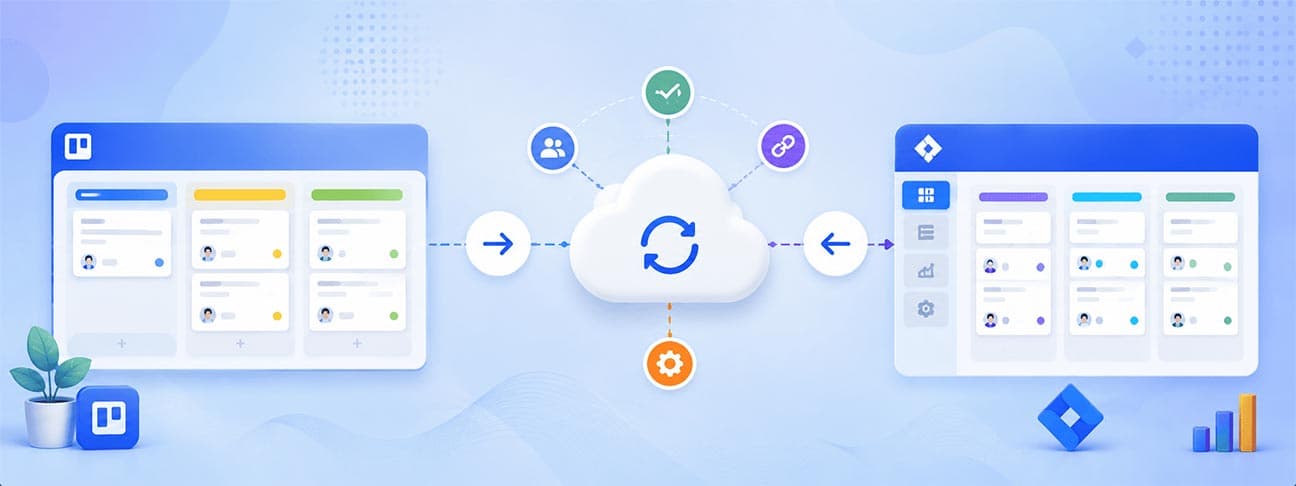
Automated synchronization bridges the gap between Trello and Jira by ensuring updates made in one platform are reflected in the other without manual intervention.
Benefits Include:
- Automated Data Synchronization
- Reduced Manual Work
- Consistent Project Data
- Improved Collaboration
- Enhanced Workflow Efficiency
Key Benefits of Syncing Trello to Jira
Centralized Project Visibility
By synchronizing Trello cards with Jira issues, teams gain complete visibility into project progress regardless of which platform they use.
Reduced Manual Data Entry
Automation eliminates repetitive tasks such as copying updates, descriptions, due dates, and comments between systems.
Improved Team Collaboration
Project managers, developers, and stakeholders can continue using their preferred tools while maintaining alignment across teams.
Data Consistency Across Platforms
Changes made in Trello automatically update corresponding Jira issues, ensuring information remains accurate and up to date.
Enhanced Productivity
Teams spend less time managing systems and more time focusing on project delivery and business objectives.
Real-World Applications
Software Development Teams
Keep project boards synchronized with development tasks, bug tracking, and sprint management activities.
Agile Project Management
Enable seamless collaboration between business teams using Trello and development teams working within Jira.
Product Development Workflows
Track product requirements, feature requests, and development progress across multiple teams.
Marketing & Development Collaboration
Bridge communication gaps between marketing teams managing campaigns in Trello and technical teams tracking implementation in Jira.
Enterprise Project Management
Provide a unified workflow across departments while allowing teams to continue using their preferred tools.
Cross-Functional Team Coordination
Improve transparency and collaboration among stakeholders involved in project planning, execution, and delivery.
Solution Architecture
- Automated Synchronization
- Real-Time Updates
- Consistent Data Mapping
- Centralized Workflow Management
- Improved Collaboration
- Reduced Administrative Overhead
Platform Workflow
Trello Event Detection
The workflow monitors Trello activities such as card creation, updates, comments, label changes, and attachments.
Data Validation
The system validates the Trello card information and retrieves relevant details required for synchronization.
Issue Identification
A predefined custom field is used to identify the corresponding Jira issue and establish the connection between both platforms.
Automated Updates
Relevant Jira fields such as descriptions, summaries, due dates, comments, and statuses are automatically updated based on changes made in Trello.
Monitoring & Optimization
The workflow continuously monitors updates while preventing duplicate actions and synchronization loops to maintain system stability.
Technical Advantages
Automation
Eliminates repetitive manual updates and reduces the risk of human error across project management processes.
Transparency
Ensures all stakeholders have access to consistent and up-to-date project information.
Scalability
Supports growing teams and complex workflows without increasing administrative effort.
Flexibility
Allows organizations to customize synchronization rules and field mappings based on business requirements.
Operational Efficiency
Improves workflow management by connecting teams, tools, and processes through automated integrations.
Real-World Example: Software Development Team Integration
Trello–Jira Cross-Platform Sync
Project Objectives
Synchronize a software development team's Trello project boards with their Jira issue tracker to eliminate duplication and align business and technical teams.
Key Features Implemented
- Automated card-to-issue synchronization on Trello updates
- Real-time status and priority propagation across platforms
- Comment and attachment mirroring between systems
- Custom field mapping for project metadata
- Duplicate action prevention and sync-loop protection
Business Outcome
Eliminated duplicate data entry for a 25-person team, improved cross-team project visibility, and reduced time spent on manual updates by approximately 8 hours per week.
Final Thoughts
Integrating Trello and Jira creates a powerful project management ecosystem that combines visual task organization with advanced issue tracking capabilities. Through automation, businesses can eliminate manual processes, improve collaboration, and maintain consistent project data across teams.
A well-designed synchronization workflow not only enhances productivity but also helps organizations deliver projects faster and with greater accuracy.
At Laitkor Consultancy Services, we specialize in workflow automation, custom integrations, and project management solutions that help businesses optimize operations and improve collaboration. Whether you're integrating Trello and Jira or building custom automation workflows, our team delivers scalable solutions tailored to your needs.
Streamline your project management processes with Trello and Jira integration — and empower your teams with smarter, faster, and more connected workflows.
Need Expert Development Help?
Cloud-ready, high-performance applications tailored to your specific business needs.
About the Author